<?xml version="1.0" encoding="utf-8"?>
<feed xmlns="http://www.w3.org/2005/Atom">
  <title>Jonas Brusman</title>
  <subtitle>I like to do high fives, take photographs and make cool things with Ruby and JavaScript.</subtitle>
  <link href="https://jonas.brusman.se/rss.xml" rel="self"/>
  <link href="https://jonas.brusman.se/"/>
  <updated>2025-04-20T09:00:00Z</updated>
  <id>https://jonas.brusman.se/</id>
  <author>
    <name>Jonas Brusman</name>
  </author>
    
    <entry>
      <title>Now – 2025 April</title>
      <link href="https://jonas.brusman.se/now-2025-april/"/>
      <updated>2025-04-20T09:00:00Z</updated>
      <id>https://jonas.brusman.se/now-2025-april/</id>
      <content type="html">
        <![CDATA[<ul>
<li>
<p>🎧 Music – <a href="https://www.last.fm/user/himynameisjonas">Top artists the last 30 days</a></p>
<p><img src="https://jonas.brusman.se/images/top-30-artist-2025-april.png" alt="Top artists the last 30 days" /></p>
<ul>
<li><strong>Cocteau Twins</strong> 55 plays</li>
<li><strong>Broder Daniel</strong> 15 plays</li>
<li><strong>Beach House</strong> 13 plays</li>
<li><strong>The Hidden Cameras</strong> 13 plays</li>
<li><strong>Tunde Adebimpe</strong> 13 plays</li>
<li><strong>Slowdive</strong> 10 plays</li>
<li><strong>Asobi Seksu</strong> 9 plays</li>
<li><strong>Markus Krunegård</strong> 9 plays</li>
</ul>
</li>
<li>
<p>📚 Books (Follow me on <a href="https://hardcover.app/@himynameisjonas">Hardcover</a> or <a href="https://www.goodreads.com/user/show/1769297-jonas-brusman">Goodreads</a>)</p>
<ul>
<li>Currently reading <a href="https://hardcover.app/books/kallbrand/editions/31981285"><strong>Kallbrand</strong> by Cilla Börjlind and Rolf Börjlind</a>, the fifth book in the <a href="https://hardcover.app/series/ronning-stilton">Rönning &amp; Stilton series</a>.</li>
<li>Just finished the <a href="https://hardcover.app/books/sov-du-lilla-videung"><strong>Sov du lilla videung</strong> by Cilla Börjlind and Rolf Börjlind</a></li>
</ul>
</li>
<li>
<p>🎮 Games</p>
<ul>
<li>Have had super fun playing <a href="https://jonas.brusman.se/minecraft-cross-play/">Minecraft</a> with almost the whole family, everyone except Nora, who’s a bit young at just 2 years old.</li>
<li>Still playing <a href="https://www.reachthefinals.com/">The Finals</a> whenever I get the chance.</li>
<li>Had two after works/board game nights with my coworkers, playing <a href="https://boardgamegeek.com/boardgame/167791/terraforming-mars">Terraforming Mars</a> both times.</li>
<li>Bought <a href="https://boardgamegeek.com/boardgame/373106/sky-team">Sky Team</a> to <a href="https://tacocat.space/@eva">Eva</a> as a birthday present but we haven't had time to play it yet.</li>
</ul>
</li>
<li>
<p>🏢 Work</p>
<ul>
<li>Mostly been focusing on unifying our different &quot;stacks&quot; into one single frontend, i.e have <a href="https://app.teamtailor.com/">our Ember app</a> talking to different backends in different regions.</li>
</ul>
</li>
</ul>
<hr><p>Have some thoughts? <a href="mailto:blog@brusman.se?subject=Re: Now – 2025 April">Send me an email.</a></p>
        ]]>
      </content>
    </entry>
    
    <entry>
      <title>Minecraft cross-play between Playstation, Switch and Mac</title>
      <link href="https://jonas.brusman.se/minecraft-cross-play/"/>
      <updated>2025-03-15T17:35:00Z</updated>
      <id>https://jonas.brusman.se/minecraft-cross-play/</id>
      <content type="html">
        <![CDATA[<p>My wife, friends, and I used to play Minecraft together, but we haven't done that in years, like since we had kids. Now the kids are old enough to play Minecraft themselves, and we want to play together again as a family.</p>
<p>The problem is that the kids play on a PlayStation 5 and a Nintendo Switch, while we parents play on Mac computers, and Minecraft doesn't support cross-play between the Bedrock (consoles) and Java Edition (Mac/PC).</p>
<h2>Enter Geyser</h2>
<p><a href="https://geysermc.org/">Geyser</a> is a plugin for the Java Edition that allows Bedrock Edition clients to join the Java Edition server. See their <a href="https://geysermc.org/wiki/geyser/setup/">Setup Instructions</a> for how to install it. I did a quick evaluation/comparison of the <a href="https://geysermc.org/wiki/geyser/supported-hosting-providers">listed hosting providers</a> and found that <a href="https://cloudnord.net/aff.php?aff=40">CloudNord hosting</a> has built in support for Geyser.</p>
<blockquote>
<p>I've been a very happy CloudNord customer for my Minecraft hosting. If you're looking for Minecraft server hosting, you can use <a href="https://cloudnord.net/aff.php?aff=40">my affiliate link</a> to sign up - and I'll receive some hosting credits.</p>
</blockquote>
<p>You will also probably need to install the <a href="https://geysermc.org/wiki/floodgate/">Floodgate extension</a>; it handles some account-specific things between Bedrock and Java Edition players.</p>
<h2>Connecting to the Server</h2>
<p>It is still a <a href="https://geysermc.org/wiki/geyser/using-geyser-with-consoles">bit complicated</a> to connect to a Java server from Switch/PlayStation when Geyser is up and running, but there's a nice solution for that as well: the <a href="https://github.com/MCXboxBroadcast/Broadcaster">MCXboxBroadcast Geyser extension</a>. That uses an Xbox Live account, and every friend of that account will see it as online on the server, which makes it easy to join the server from both Switch and PlayStation. I created a new dummy account for this purpose and made sure to befriend everyone who should be able to join the server.</p>
<hr><p>Have some thoughts? <a href="mailto:blog@brusman.se?subject=Re: Minecraft cross-play between Playstation, Switch and Mac">Send me an email.</a></p>
        ]]>
      </content>
    </entry>
    
    <entry>
      <title>Webmentions</title>
      <link href="https://jonas.brusman.se/webmentions/"/>
      <updated>2025-03-15T08:30:00Z</updated>
      <id>https://jonas.brusman.se/webmentions/</id>
      <content type="html">
        <![CDATA[<p>I came across a <a href="https://ttntm.me/blog/implementing-webmentions/">blog post by Tom where he discusses his simple webmention implementation in Eleventy</a>.</p>
<p>I decided to do something similar for this site, so now each post includes webmention statistics instead of the already existing stats from the Fediverse.</p>
<p>I made <a href="https://github.com/himynameisjonas/jonas.brusman.se/commit/263ab9bc0894421ebebaa75f8e92b8aa8aa91fed#diff-8b43a81e37dfe07b699be671ac44b58fece73e27f8dbc2e1fda99c0e13ffec90R24-R26">one small change</a> to the webmention fetch function by combining <code>mention-of</code> and <code>in-reply-to</code> numbers.</p>
<hr><p>Have some thoughts? <a href="mailto:blog@brusman.se?subject=Re: Webmentions">Send me an email.</a></p>
        ]]>
      </content>
    </entry>
    
    <entry>
      <title>How to fix a non-opening electric door on the passenger side of a Volkswagen Sharan after replacing the 12V battery</title>
      <link href="https://jonas.brusman.se/volkswagen-sharan-door-issue/"/>
      <updated>2025-02-24T20:24:00Z</updated>
      <id>https://jonas.brusman.se/volkswagen-sharan-door-issue/</id>
      <content type="html">
        <![CDATA[<p><em>I thought the fix was so weird that I decided to write a blog post about it.</em></p>
<p>Have you ever wondered why the electric door on the passenger side of the Volkswagen Sharan won't open after you've fitted a new battery? Neither had I until last week when I picked up my car from the mechanic and noticed that the door button was blinking, and nothing happened when I pressed it. The closing mechanism was working fine after I, with quite some force, opened the door manually.</p>
<p>I asked the shop for help, but they were clueless and tried to diagnose the issue by connecting their iPad to the car's diagnostic port and running a series of tests with no luck. While they did that, I decided to do a quick search online and found a potential solution on <a href="https://www.volkswagenforum.co.uk/posts/163876/">a forum</a>. The solution is to reset the automatic window setup on the door that won't open.</p>
<h3>The solution</h3>
<ol>
<li>Using the window button on the door that won't open, open the window fully.</li>
<li>Release the button and press it again for 3 seconds.</li>
<li>Close the window fully.</li>
<li>Release the button and press it again for 3 seconds.</li>
</ol>
<p>I did this once, and the blinking stopped, and the door opened when I pressed the door button. It was a <strong>weird</strong> fix, but it worked!</p>
<hr />
<p><em>PS. I do like long blog post titles.</em></p>
<hr><p>Have some thoughts? <a href="mailto:blog@brusman.se?subject=Re: How to fix a non-opening electric door on the passenger side of a Volkswagen Sharan after replacing the 12V battery">Send me an email.</a></p>
        ]]>
      </content>
    </entry>
    
    <entry>
      <title>Now – 2025 February</title>
      <link href="https://jonas.brusman.se/now-2025-february/"/>
      <updated>2025-02-24T09:00:00Z</updated>
      <id>https://jonas.brusman.se/now-2025-february/</id>
      <content type="html">
        <![CDATA[<ul>
<li>🏢 Work
<ul>
<li>I'm still enjoying my role as a <em>señor</em> developer at <a href="https://career.teamtailor.com/departments/product">Teamtailor</a>, now in my 11th year. 🚀</li>
</ul>
</li>
<li>📚 Books (Follow me on <a href="https://hardcover.app/@himynameisjonas">Hardcover</a> or <a href="https://www.goodreads.com/user/show/1769297-jonas-brusman">Goodreads</a>)
<ul>
<li>Currently reading <a href="https://hardcover.app/books/spring-tide-2012/editions/31892694">Springfloden Cilla Börjlind, Rolf Börjlind</a></li>
<li>Just finished the <a href="https://hardcover.app/series/beartown">Beartown series by Fredrik Backman</a></li>
</ul>
</li>
<li>🎮 Games
<ul>
<li><a href="https://www.reachthefinals.com/">The Finals</a></li>
<li><a href="https://boardgamegeek.com/boardgame/167791/terraforming-mars">Terraforming Mars</a></li>
</ul>
</li>
</ul>
<hr><p>Have some thoughts? <a href="mailto:blog@brusman.se?subject=Re: Now – 2025 February">Send me an email.</a></p>
        ]]>
      </content>
    </entry>
    
    <entry>
      <title>Zed and Standard Ruby</title>
      <link href="https://jonas.brusman.se/zed-and-standard-ruby/"/>
      <updated>2024-07-02T18:49:00Z</updated>
      <id>https://jonas.brusman.se/zed-and-standard-ruby/</id>
      <content type="html">
        <![CDATA[<h3>Update 2024-08-30</h3>
<p>You can enable Standard formatting with the built in ruby-lsp extension in Zed. Just add this to your <code>config.json</code>:</p>
<pre class="language-json"><code class="language-json"><span class="token property">"languages"</span><span class="token operator">:</span> <span class="token punctuation">{</span>
  <span class="token property">"Ruby"</span><span class="token operator">:</span> <span class="token punctuation">{</span>
    <span class="token property">"language_servers"</span><span class="token operator">:</span> <span class="token punctuation">[</span><span class="token string">"ruby-lsp"</span><span class="token punctuation">,</span> <span class="token string">"!solargraph"</span><span class="token punctuation">,</span> <span class="token string">"!rubocop"</span><span class="token punctuation">]</span><span class="token punctuation">,</span>
    <span class="token property">"formatter"</span><span class="token operator">:</span> <span class="token string">"language_server"</span>
  <span class="token punctuation">}</span><span class="token punctuation">,</span>
<span class="token punctuation">}</span><span class="token punctuation">,</span>
<span class="token property">"lsp"</span><span class="token operator">:</span> <span class="token punctuation">{</span>
  <span class="token property">"ruby-lsp"</span><span class="token operator">:</span> <span class="token punctuation">{</span>
    <span class="token property">"initialization_options"</span><span class="token operator">:</span> <span class="token punctuation">{</span>
      <span class="token property">"enabledFeatures"</span><span class="token operator">:</span> <span class="token punctuation">{</span>
        <span class="token property">"diagnostics"</span><span class="token operator">:</span> <span class="token boolean">false</span><span class="token punctuation">,</span>
        <span class="token property">"formatting"</span><span class="token operator">:</span> <span class="token boolean">true</span>
      <span class="token punctuation">}</span><span class="token punctuation">,</span>
      <span class="token property">"formatter"</span><span class="token operator">:</span> <span class="token string">"standard"</span>
    <span class="token punctuation">}</span>
  <span class="token punctuation">}</span>
<span class="token punctuation">}</span>
</code></pre>
<h1>Zed and Standard Ruby</h1>
<p>I’ve been using <strong><a href="https://zed.dev/">Zed</a></strong> as my main editor for the last two weeks or so. It feels great, lean, and fast compared to VS Code that I’ve been using for years. Last time I tried Zed, there were no possibilities to install extensions or add/customize language servers, <a href="https://zed.dev/blog/language-extensions-part-1">but this has changed</a>, and there are more and more extensions being built.</p>
<p>I missed one particular feature while working with Ruby code, <strong>formatting with <a href="https://github.com/standardrb/standard">Standard</a></strong> (<em>&quot;…a linter &amp; formatter built on RuboCop…&quot;</em>) so I set out on a mission to try to create one, <em>how hard can it be?</em></p>
<p>Turns out it was a bit harder than I thought but not too bad. You have to write Rust, which I had never done before. Luckily, there were a lot of extensions to look at, and with that, I could quite quickly throw together a working extension that wraps Standard’s language server and uses that for linting and formatting.</p>
<h2>Introducing the Standard extension for Zed</h2>
<p><img src="https://jonas.brusman.se/images/zed-standard-ruby.png" alt="Screenshot showing the Standard extension in use within Zed" /></p>
<p>Github: <strong><a href="https://github.com/himynameisjonas/zed-standardrb">himynameisjonas/zed-standardrb</a></strong></p>
<p>The implementation is quite naive, and I'm not sure if I should submit it to Zed's extension library. We'll see. But until then, you can clone/download the code and use the &quot;install dev extension&quot; feature to use it yourself.</p>
<p>To enable it, you can add this snippet to your <code>config.json</code>:</p>
<pre class="language-json"><code class="language-json"><span class="token property">"languages"</span><span class="token operator">:</span> <span class="token punctuation">{</span>
  <span class="token property">"Ruby"</span><span class="token operator">:</span> <span class="token punctuation">{</span>
    <span class="token property">"language_servers"</span><span class="token operator">:</span> <span class="token punctuation">[</span><span class="token string">"standardrb"</span><span class="token punctuation">]</span>
  <span class="token punctuation">}</span>
<span class="token punctuation">}</span><span class="token punctuation">,</span></code></pre>
<p>Feel free to contribute or give feedback. I'm sure there are a lot of improvements that can be made, but for now, it works for me, and I have a huge lack of time to work on it further. I hope it can be useful for someone else as well.</p>
<hr><p>Have some thoughts? <a href="mailto:blog@brusman.se?subject=Re: Zed and Standard Ruby">Send me an email.</a></p>
        ]]>
      </content>
    </entry>
    
    <entry>
      <title>Glyphhanger – subset fonts for the web</title>
      <link href="https://jonas.brusman.se/glyphhanger/"/>
      <updated>2024-05-17T19:28:00Z</updated>
      <id>https://jonas.brusman.se/glyphhanger/</id>
      <content type="html">
        <![CDATA[<p>This site uses two custom fonts, and I wanted to see if I could make them smaller to improve loading times. I found a tool called <a href="https://www.zachleat.com/web/glyphhanger/">Glyphhanger</a> that does just that: subsetting fonts to only include the characters needed.</p>
<h2>The &quot;logo&quot;</h2>
<p>The &quot;logo&quot; on this site that is set in a custom font. It felt very wasteful to load the entire font just for displaying my name. Using the following command (I used Docker to run the tool to avoid installing all dependencies on my machine), I shrunk the font file from 79KB to just 6.5KB.</p>
<pre class="language-sh"><code class="language-sh"><span class="token function">docker</span> run <span class="token parameter variable">--rm</span> <span class="token parameter variable">-v</span> <span class="token string">"./:/app"</span> talentplatforms/glyphhanger <span class="token parameter variable">--whitelist</span><span class="token operator">=</span><span class="token string">"JONAS BRUSMAN"</span> <span class="token parameter variable">--family</span><span class="token operator">=</span><span class="token string">"Tropi Land"</span> <span class="token parameter variable">--subset</span><span class="token operator">=</span>TropiLand.ttf <span class="token parameter variable">--formats</span><span class="token operator">=</span>woff2,woff,woff-zopfli <span class="token parameter variable">--css</span></code></pre>
<p>I ran the command in the directory where the font file is located. The <code>--whitelist</code> flag specifies the characters I want to include in the subset. The <code>--family</code> flag specifies the name of the font. The <code>--subset</code> flag specifies the name of the output file. The <code>--formats</code> flag specifies the formats I want to generate. The <code>--css</code> flag generates a CSS file with the <code>@font-face</code> rule that I copied and pasted into my site's CSS file.</p>
<h2>The main font</h2>
<p>The main font on this site is also a custom font. I used the following command to shrink the font file from 318KB to just 32.7KB.</p>
<pre class="language-sh"><code class="language-sh"><span class="token function">docker</span> run <span class="token parameter variable">--rm</span> <span class="token parameter variable">-v</span> <span class="token string">"./:/app"</span> talentplatforms/glyphhanger http://host.docker.internal:8080/texts/ http://host.docker.internal:8080/photos/ <span class="token parameter variable">--jsdom</span> <span class="token parameter variable">--US_ASCII</span> <span class="token parameter variable">--family</span><span class="token operator">=</span><span class="token string">"Overpass"</span> <span class="token parameter variable">--subset</span><span class="token operator">=</span>Overpass-VariableFont_wght.ttf <span class="token parameter variable">--formats</span><span class="token operator">=</span>woff2,woff,woff-zopfli <span class="token parameter variable">--css</span></code></pre>
<p>This time I used the <code>--jsdom</code> flag to make the tool visit the URLs I specified to find the characters used on the site. I ran a local server (using Eleventy) on port 8080 and pointed the tool to the URLs where the text is located. The rest of the flags are the same as in the previous command.</p>
<hr><p>Have some thoughts? <a href="mailto:blog@brusman.se?subject=Re: Glyphhanger – subset fonts for the web">Send me an email.</a></p>
        ]]>
      </content>
    </entry>
    
    <entry>
      <title>Farewell Inter, Hello Overpass and Tropi Land</title>
      <link href="https://jonas.brusman.se/farewell-inter-hello-overpass-and-tropi-land/"/>
      <updated>2024-03-19T06:54:00Z</updated>
      <id>https://jonas.brusman.se/farewell-inter-hello-overpass-and-tropi-land/</id>
      <content type="html">
        <![CDATA[<p>I got, <em>as usual</em>, bored with the previous design of this site, so I decided to change it. This is something that happens from time to time and it gives me the chance to experiment with new things.</p>
<h2>Some <s>more or</s> less notable changes</h2>
<ul>
<li>New colors which I found on <a href="https://tacocat.space/@randomColorContrasts@botsin.space">@randomColorContrasts@botsin.space</a>.</li>
<li>Trying out <a href="https://openheart.fyi/">Open Heart Protocol</a> buttons on each post, a tiny heart button to show appreciation for the post. Found out about it from <a href="https://www.benji.dog/articles/interactions-or-reactions/">benji</a>.</li>
<li>Removed <a href="https://rsms.me/inter/">Inter</a> and replaced it with two new fonts:
<ul>
<li>Added <a href="https://www.fontspace.com/tropi-land-font-f101440">Tropi Land</a> as the custom font for the &quot;logo&quot; to give it a more playful look.</li>
<li>Added <a href="https://overpassfont.org/">Overpass</a> as the main font for the site.</li>
<li>Used <a href="https://github.com/zachleat/glyphhanger">Glyphhanger</a> to subset the fonts to only the characters used on the site. Overpass went from 310.95 KB to 31.98 KB and Tropi Land from 77.11 KB to 6.42 KB.</li>
</ul>
</li>
<li>Renamed Notes to <a href="https://jonas.brusman.se/articles/">Articles</a>, not sure if that will stick but notes sounded too much like short posts. Maybe it will come back, but as a syndication of the notes I post on <a href="https://tacocat.space/@jonas">Mastodon</a>.</li>
<li>Sprinkled some <a href="http://heroicons.com/">icons from Heroicons</a> to the main elements/navigation.</li>
<li>Replaced <a href="https://instant.page/">Instantpage</a> with <a href="https://getquick.link/">Quicklink</a> for prefetching links.</li>
<li>Setup <a href="https://vitejs.dev/">Vite</a> for js bundling with <a href="https://github.com/11ty/eleventy-plugin-vite">eleventy-plugin-vite</a>.</li>
</ul>
<hr><p>Have some thoughts? <a href="mailto:blog@brusman.se?subject=Re: Farewell Inter, Hello Overpass and Tropi Land">Send me an email.</a></p>
        ]]>
      </content>
    </entry>
    
    <entry>
      <title>Introducing the new bookmarks page</title>
      <link href="https://jonas.brusman.se/introducing-the-new-bookmarks-page/"/>
      <updated>2024-03-06T07:42:06Z</updated>
      <id>https://jonas.brusman.se/introducing-the-new-bookmarks-page/</id>
      <content type="html">
        <![CDATA[<p>I have added a new page to this site: <a href="https://jonas.brusman.se/bookmarks/">Bookmarks</a>, where I will share links I find interesting or good. You can subscribe to it with its <a href="https://jonas.brusman.se/bookmarks/rss.xml">new RSS feed</a>.</p>
<p>I suppose it will include links related to my interests, such as web development, programming in general, photography, the IndieWeb, and other random things.</p>
<hr><p>Have some thoughts? <a href="mailto:blog@brusman.se?subject=Re: Introducing the new bookmarks page">Send me an email.</a></p>
        ]]>
      </content>
    </entry>
    
    <entry>
      <title>Deploy an Eleventy site to Cloudflare Pages efficiently with GitHub&#39;s action cache</title>
      <link href="https://jonas.brusman.se/deploy-eleventy-to-cloudflare-with-githubs-action-cache/"/>
      <updated>2024-02-29T00:00:00Z</updated>
      <id>https://jonas.brusman.se/deploy-eleventy-to-cloudflare-with-githubs-action-cache/</id>
      <content type="html">
        <![CDATA[<p>I have wanted to move this site from <em>Netlify</em> for a while now, but the <a href="https://www.reddit.com/r/webdev/s/2A07zZuKoQ">recent news about their bandwidth pricing</a> made me finally do it. I looked into some alternatives (like Render, Cloudflare, Vercel, etc.) and decided to go with Cloudflare Pages. I liked Cloudflare the best because of their generous free tier.</p>
<p>I connected my GitHub repository to Cloudflare Pages and had Cloudflare build and deploy the site. It worked, but was really slow due to the large photos it has to process every time it rebuilds. <strong>It took over 14 minutes to build and deploy the site</strong> 😩. Cloudflare supports build caching, but only for a few specific frameworks, and unfortunately, Eleventy is not one of them.</p>
<p>I remember reading about how <a href="https://localghost.dev/blog/how-i-deploy-my-eleventy-site-to-neocities/">Sophie Koonin deploys her site to NeoCities using GitHub Actions</a> (go read that; it is a really good write-up of how things work). Knowing that GitHub Actions has support for custom caching, I decided to do the same but with Cloudflare Pages instead of NeoCities.</p>
<h2>Deploy to Cloudflare Pages with GitHub Actions</h2>
<p>I created a GitHub Actions workflow that caches the <code>node_modules</code> and <code>.cache</code> directories, as well as the <code>img</code> directory where the photos are stored. This reduced the build time to <strong>just over 2 minutes, a 7x improvement</strong>!</p>
<h3>The full workflow</h3>
<p>This is the complete workflow as I write this post. I may have updated it since then, so please refer to the <a href="https://github.com/himynameisjonas/jonas.brusman.se/blob/master/.github/workflows/deploy.yml">source code</a> for the latest version.</p>
<pre class="language-yaml"><code class="language-yaml"><span class="token key atrule">name</span><span class="token punctuation">:</span> Build and Deploy

<span class="token key atrule">on</span><span class="token punctuation">:</span>
  <span class="token key atrule">push</span><span class="token punctuation">:</span>
    <span class="token key atrule">branches</span><span class="token punctuation">:</span> <span class="token punctuation">[</span><span class="token string">"master"</span><span class="token punctuation">]</span>
  <span class="token key atrule">pull_request</span><span class="token punctuation">:</span>
    <span class="token key atrule">branches</span><span class="token punctuation">:</span> <span class="token punctuation">[</span><span class="token string">"master"</span><span class="token punctuation">]</span>
  <span class="token key atrule">schedule</span><span class="token punctuation">:</span>
    <span class="token punctuation">-</span> <span class="token key atrule">cron</span><span class="token punctuation">:</span> <span class="token string">"17 8 * * 6"</span>

<span class="token key atrule">jobs</span><span class="token punctuation">:</span>
  <span class="token key atrule">build</span><span class="token punctuation">:</span>
    <span class="token key atrule">name</span><span class="token punctuation">:</span> <span class="token string">"Build and Deploy"</span>
    <span class="token key atrule">runs-on</span><span class="token punctuation">:</span> ubuntu<span class="token punctuation">-</span>latest

    <span class="token key atrule">steps</span><span class="token punctuation">:</span>
      <span class="token punctuation">-</span> <span class="token key atrule">uses</span><span class="token punctuation">:</span> actions/checkout@v3
      <span class="token punctuation">-</span> <span class="token key atrule">uses</span><span class="token punctuation">:</span> actions/setup<span class="token punctuation">-</span>node@v4
        <span class="token key atrule">with</span><span class="token punctuation">:</span>
          <span class="token key atrule">node-version</span><span class="token punctuation">:</span> 20.10.0
          <span class="token key atrule">cache</span><span class="token punctuation">:</span> <span class="token string">"yarn"</span>
      <span class="token punctuation">-</span> <span class="token key atrule">run</span><span class="token punctuation">:</span> yarn install <span class="token punctuation">-</span><span class="token punctuation">-</span>frozen<span class="token punctuation">-</span>lockfile

      <span class="token punctuation">-</span> <span class="token key atrule">uses</span><span class="token punctuation">:</span> actions/cache/restore@v4
        <span class="token key atrule">id</span><span class="token punctuation">:</span> cache
        <span class="token key atrule">with</span><span class="token punctuation">:</span>
          <span class="token key atrule">path</span><span class="token punctuation">:</span> <span class="token punctuation">|</span><span class="token scalar string">
            .cache
            img</span>
          <span class="token key atrule">key</span><span class="token punctuation">:</span> 11ty<span class="token punctuation">-</span>$<span class="token punctuation">{</span><span class="token punctuation">{</span> runner.os <span class="token punctuation">}</span><span class="token punctuation">}</span><span class="token punctuation">-</span>$<span class="token punctuation">{</span><span class="token punctuation">{</span> github.run_id <span class="token punctuation">}</span><span class="token punctuation">}</span>
          <span class="token key atrule">restore-keys</span><span class="token punctuation">:</span> <span class="token punctuation">|</span><span class="token scalar string">
            11ty-${{ runner.os }}
            ${{ runner.os }}-11ty</span>

      <span class="token punctuation">-</span> <span class="token key atrule">name</span><span class="token punctuation">:</span> Build 11ty site
        <span class="token key atrule">run</span><span class="token punctuation">:</span> yarn build
        <span class="token key atrule">env</span><span class="token punctuation">:</span>
          <span class="token key atrule">ENABLE_ANALYTICS</span><span class="token punctuation">:</span> $<span class="token punctuation">{</span><span class="token punctuation">{</span> github.ref == 'refs/heads/master' <span class="token punctuation">}</span><span class="token punctuation">}</span>

      <span class="token punctuation">-</span> <span class="token key atrule">name</span><span class="token punctuation">:</span> Publish to Cloudflare Pages
        <span class="token key atrule">uses</span><span class="token punctuation">:</span> cloudflare/pages<span class="token punctuation">-</span>action@v1
        <span class="token key atrule">with</span><span class="token punctuation">:</span>
          <span class="token key atrule">apiToken</span><span class="token punctuation">:</span> $<span class="token punctuation">{</span><span class="token punctuation">{</span> secrets.CLOUDFLARE_API_TOKEN <span class="token punctuation">}</span><span class="token punctuation">}</span>
          <span class="token key atrule">accountId</span><span class="token punctuation">:</span> 8dfec48c278d5a97c93de33e072261bd
          <span class="token key atrule">projectName</span><span class="token punctuation">:</span> jonas<span class="token punctuation">-</span>brusman<span class="token punctuation">-</span>se
          <span class="token key atrule">directory</span><span class="token punctuation">:</span> dist
          <span class="token key atrule">gitHubToken</span><span class="token punctuation">:</span> $<span class="token punctuation">{</span><span class="token punctuation">{</span> secrets.GITHUB_TOKEN <span class="token punctuation">}</span><span class="token punctuation">}</span>
          <span class="token key atrule">branch</span><span class="token punctuation">:</span> $<span class="token punctuation">{</span><span class="token punctuation">{</span> github.head_ref <span class="token punctuation">|</span><span class="token punctuation">|</span> github.ref_name <span class="token punctuation">}</span><span class="token punctuation">}</span>
          <span class="token key atrule">wranglerVersion</span><span class="token punctuation">:</span> <span class="token string">"3"</span>

      <span class="token punctuation">-</span> <span class="token key atrule">uses</span><span class="token punctuation">:</span> actions/cache/save@v4
        <span class="token key atrule">with</span><span class="token punctuation">:</span>
          <span class="token key atrule">path</span><span class="token punctuation">:</span> <span class="token punctuation">|</span><span class="token scalar string">
            .cache
            img</span>
          <span class="token key atrule">key</span><span class="token punctuation">:</span> 11ty<span class="token punctuation">-</span>$<span class="token punctuation">{</span><span class="token punctuation">{</span> runner.os <span class="token punctuation">}</span><span class="token punctuation">}</span><span class="token punctuation">-</span>$<span class="token punctuation">{</span><span class="token punctuation">{</span> github.run_id <span class="token punctuation">}</span><span class="token punctuation">}</span></code></pre>
<p>The workflow does the following:</p>
<ol>
<li>Checks out the code and sets up Node.js with a specific version, enabling caching for dependencies installed with Yarn.</li>
<li>Installs dependencies using Yarn.</li>
<li>Restores cached directories for faster builds. I use the unique <code>github.run_id</code> to create a unique key for the cache so it can be updated with new content/images on every build.</li>
<li>Builds the 11ty site and sets some environment variables for the build.</li>
<li>Publishes the site to Cloudflare Pages using the <a href="https://github.com/cloudflare/pages-action">Cloudflare Pages Action</a>, specifying project details and authentication. I had to specify the branch name manually with <code>branch: ${{ github.head_ref || github.ref_name }}</code> to make it work with pull requests.</li>
<li>Caches the contents in the specified directories to speed up future builds.</li>
</ol>
<hr><p>Have some thoughts? <a href="mailto:blog@brusman.se?subject=Re: Deploy an Eleventy site to Cloudflare Pages efficiently with GitHub&#39;s action cache">Send me an email.</a></p>
        ]]>
      </content>
    </entry>
    
    <entry>
      <title>Another success story with Jemalloc</title>
      <link href="https://jonas.brusman.se/another-success-story-with-jemalloc/"/>
      <updated>2023-12-27T20:17:29Z</updated>
      <id>https://jonas.brusman.se/another-success-story-with-jemalloc/</id>
      <content type="html">
        <![CDATA[<p>I recently merged a Pull Request to enable Jemalloc in our (Teamtailor's) production Rails app, and the results were impressive.</p>
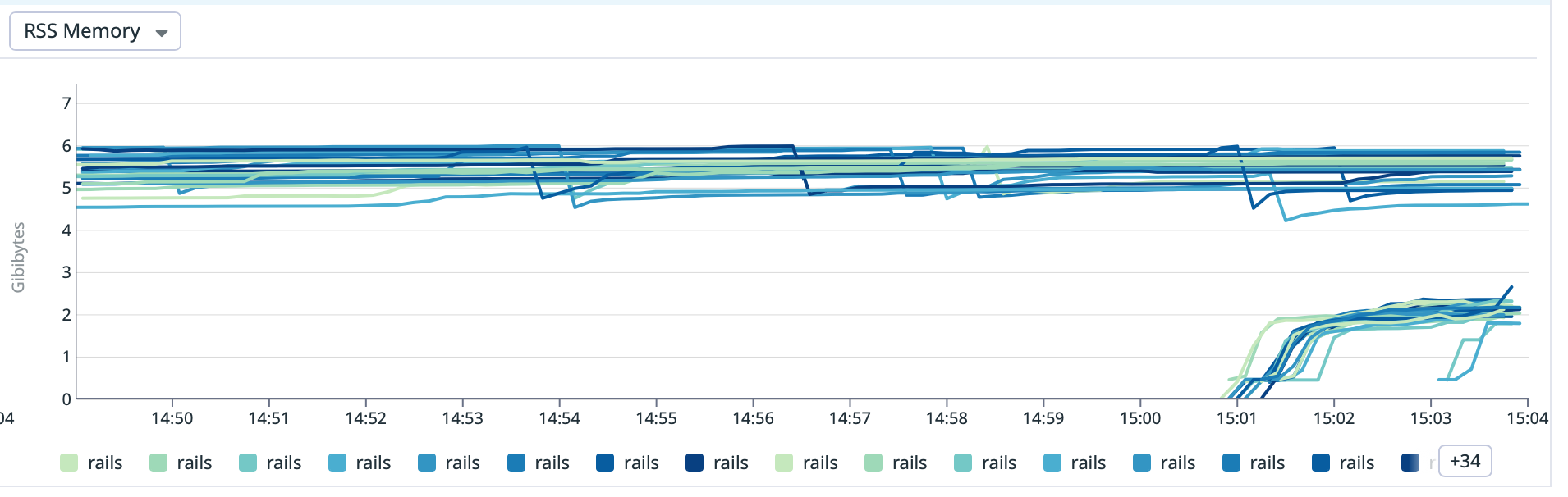
<p><img src="https://photo-storage.brusman.se/jemalloc/ed1719d6225f87e3.png" alt="A graph showing memory usage before (6GB) and after (2.5GB)" /></p>
<p>After deploying Jemalloc, our app's memory usage decreased from around 6 GB to just 2.5 GB. Super nice!</p>
<p>Our next step involved switching to ARM architecture with AWS Graviton for our ECS tasks, resulting in improved performance at a lower cost. Two big wins in a short time!</p>
<hr><p>Have some thoughts? <a href="mailto:blog@brusman.se?subject=Re: Another success story with Jemalloc">Send me an email.</a></p>
        ]]>
      </content>
    </entry>
    
    <entry>
      <title>Ruby on Rails and Docker: Jemalloc in multi-platform images</title>
      <link href="https://jonas.brusman.se/ruby-on-rails-docker-jemalloc-multi-platform-image/"/>
      <updated>2023-12-05T19:29:03Z</updated>
      <id>https://jonas.brusman.se/ruby-on-rails-docker-jemalloc-multi-platform-image/</id>
      <content type="html">
        <![CDATA[<p>Teamtailor has been <a href="https://tacocat.space/@jonas/111499803357547924">running with jemalloc in production</a> for a couple of days, <a href="https://tacocat.space/@jonas/111499996256547764">with great success</a>. Today, we wanted to try running the app on AWS's Graviton, their ARM-based CPUs, to see if we could get a better cost/performance ratio.</p>
<p>Our Docker image setup for jemalloc, based on <a href="https://gist.github.com/jjb/9ff0d3f622c8bbe904fe7a82e35152fc">a gist</a> from <a href="https://mastodon.social/@johnjoseph">John Bachir</a>, was using a hard-coded path containing a reference to <code>x86_64</code>:</p>
<pre class="language-dockerfile"><code class="language-dockerfile"><span class="token instruction"><span class="token keyword">ENV</span> LD_PRELOAD=/usr/lib/x86_64-linux-gnu/libjemalloc.so.2</span>
<span class="token instruction"><span class="token keyword">ENV</span> MALLOC_CONF=<span class="token string">"dirty_decay_ms:1000,narenas:2,background_thread:true"</span></span></code></pre>
<p>The solution I came up with to support both <code>linux/amd64</code> and <code>linux/arm64</code> was to use a symlink:</p>
<pre class="language-dockerfile"><code class="language-dockerfile"><span class="token instruction"><span class="token keyword">RUN</span> ln -s /usr/lib/*-linux-gnu/libjemalloc.so.2 /usr/lib/libjemalloc.so.2</span>
<span class="token instruction"><span class="token keyword">ENV</span> LD_PRELOAD=/usr/lib/libjemalloc.so.2</span>
<span class="token instruction"><span class="token keyword">ENV</span> MALLOC_CONF=<span class="token string">"dirty_decay_ms:1000,narenas:2,background_thread:true"</span></span></code></pre>
<hr><p>Have some thoughts? <a href="mailto:blog@brusman.se?subject=Re: Ruby on Rails and Docker: Jemalloc in multi-platform images">Send me an email.</a></p>
        ]]>
      </content>
    </entry>
    
    <entry>
      <title>Hello Migadu, Goodbye Fastmail</title>
      <link href="https://jonas.brusman.se/migadu-my-new-email-provider/"/>
      <updated>2023-11-16T19:52:00Z</updated>
      <id>https://jonas.brusman.se/migadu-my-new-email-provider/</id>
      <content type="html">
        <![CDATA[<p>You might have noticed in <a href="https://jonas.brusman.se/my-default-apps-at-the-end-of-2023/">my last post</a> that I am using <a href="https://www.migadu.com/">Migadu</a> as my email service provider. Back in June, I changed my domains DNS to point to Migadu instead of Fastmail has been as worry-free as Fastmail, just cheaper. The main domain I use is based on my wife's family name, and we've got a few folks who would love to have their own <em>firstname@lastname</em> email addresses. Unfortunately, it became quite costly with my previous provider, Fastmail. So, I began exploring other options.</p>
<h2>The big win</h2>
<p>That's when I found Migadu. They have a different billing approach that works better for families like mine. Instead of charging for the number of email addresses or accounts, Migadu’s pricing depends on the volume of emails sent and received. This means I can create as many accounts, addresses, or aliases as we want without worrying about the cost.</p>
<h2>The missing stuff</h2>
<p>Migadu doesn't offer calendar or contact syncing, but I solved this by moving these functions to Apple iCloud, which is fine since I'm already in the Apple ecosystem.</p>
<hr><p>Have some thoughts? <a href="mailto:blog@brusman.se?subject=Re: Hello Migadu, Goodbye Fastmail">Send me an email.</a></p>
        ]]>
      </content>
    </entry>
    
    <entry>
      <title>My default apps at the end of 2023</title>
      <link href="https://jonas.brusman.se/my-default-apps-at-the-end-of-2023/"/>
      <updated>2023-11-07T20:48:49Z</updated>
      <id>https://jonas.brusman.se/my-default-apps-at-the-end-of-2023/</id>
      <content type="html">
        <![CDATA[<p>After scrolling past both <a href="https://adamfortuna.com/apps-i-use-2023">Adam's</a> and <a href="https://kevquirk.com/my-default-apps-at-the-end-of-2023">Kev's</a> posts on Mastodon, in which they shared their lists of default apps for 2023, I thought it might be fun to create one myself. There's even <a href="https://defaults.rknight.me/">a list of other people's posts like this</a>.</p>
<p>📨 <strong>Mail Service:</strong> <a href="https://www.migadu.com/">Migadu</a></p>
<p>📮 <strong>Mail Client:</strong> Apple Mail</p>
<p>📝 <strong>Notes:</strong> Apple Notes &amp; <a href="https://logseq.com/">Logseq</a></p>
<p>✅ <strong>To-Do:</strong> <a href="https://culturedcode.com/things/">Things</a></p>
<p>📆 <strong>Calendar:</strong> Apple Calendar</p>
<p>🗞️ <strong>RSS service:</strong> <a href="https://feedbin.com/">Feedbin</a></p>
<p>⌨️ <strong>Launcher:</strong> <a href="https://www.raycast.com/">Raycast</a></p>
<p>🛹 <strong>Clipboard manager:</strong> <a href="https://www.raycast.com/">Raycast</a></p>
<p>☁️ <strong>Cloud storage:</strong> iCloud</p>
<p>🌅 <strong>Photo library:</strong> iCloud</p>
<p>🤳🏻 <strong>Photo editing:</strong> <a href="https://darkroom.co/">Darkroom</a></p>
<p>🌐 <strong>Web Browser:</strong> <a href="https://browser.kagi.com/">Orion</a> for browsing, <a href="https://www.mozilla.org/firefox/">Firefox</a> for web development</p>
<p>💬 <strong>Chat:</strong> <a href="https://signal.org/">Signal</a></p>
<p>🎤 <strong>Podcasts:</strong> <a href="https://overcast.fm/">Overcast</a></p>
<p>🎶 <strong>Music:</strong> <a href="https://music.apple.com/">Apple Music</a></p>
<p>🔐 <strong>Passwords:</strong> <a href="https://1password.com/">1Password</a></p>
<p>💁🏻‍♂️ <strong>Social:</strong> <a href="https://tacocat.space/@jonas">Mastodon</a></p>
<p>🐘 <strong>Mastodon:</strong> <a href="https://tapbots.com/ivory/?ref=birchtree.me">Ivory</a></p>
<p>🌤️ <strong>Weather:</strong> <a href="https://www.meetcarrot.com/weather/">Carrot Weather</a></p>
<p>🔎 <strong>Search:</strong> <a href="https://kagi.com/">Kagi</a></p>
<p>🎮 <strong>First game I play each morning:</strong> <a href="https://apps.apple.com/us/app/threes-freeplay/id976851174">Threes</a></p>
<p>👨🏻‍💻 <strong>Terminal:</strong> <a href="https://iterm2.com/">iTerm2</a></p>
<p>🧮 <strong>Code Editor:</strong> <a href="https://code.visualstudio.com/">Visual Studio Code</a></p>
<p>🛍️ <strong>Grocery List:</strong> <a href="https://www.matlistan.se/">Matlistan</a></p>
<hr><p>Have some thoughts? <a href="mailto:blog@brusman.se?subject=Re: My default apps at the end of 2023">Send me an email.</a></p>
        ]]>
      </content>
    </entry>
    
    <entry>
      <title>Monitor multiple Redis servers on Heroku with Datadog</title>
      <link href="https://jonas.brusman.se/heroku-redis-monitor-with-datadog/"/>
      <updated>2023-01-22T00:00:00Z</updated>
      <id>https://jonas.brusman.se/heroku-redis-monitor-with-datadog/</id>
      <content type="html">
        <![CDATA[<p>Our main Rails app on Heroku uses multiple redis instances. We have one instance for our job queue, one for caching and one instance for our session store. This is how we setup Datadog to monitor the health of our redis instances.</p>
<p>The setup is based on <a href="https://docs.datadoghq.com/agent/guide/heroku-ruby/">Datadog's article on monitoring Ruby on Rails on Heroku</a>. So we need to enable the redis integration in Datadog by adding a file at <code>datadog/conf.d/redisdb.yaml</code> with the following content:</p>
<pre class="language-yaml"><code class="language-yaml"><span class="token key atrule">init_config</span><span class="token punctuation">:</span>

<span class="token key atrule">instances</span><span class="token punctuation">:</span>
  <span class="token comment"># populated by prerun.sh</span></code></pre>
<p>Then we need to modify the <code>datadog/prerun.sh</code> script to add the redis instances to the <code>redisdb.yaml</code> file. The script is executed before the Datadog agent is started. The script looks like this:</p>
<pre class="language-bash"><code class="language-bash"><span class="token assign-left variable">redis_regex</span><span class="token operator">=</span><span class="token string">'(\w+)_URL=redis:\/\/([^:]*):([^@]+)@([^:]+):([0-9]*)$'</span>
<span class="token function">env</span> <span class="token operator">|</span> <span class="token function">grep</span> <span class="token string">"REDIS.*_URL="</span> <span class="token operator">|</span> <span class="token keyword">while</span> <span class="token builtin class-name">read</span> <span class="token parameter variable">-r</span> line <span class="token punctuation">;</span> <span class="token keyword">do</span>
  <span class="token keyword">if</span> <span class="token punctuation">[</span><span class="token punctuation">[</span> <span class="token variable">$line</span> <span class="token operator">=~</span> <span class="token variable">$redis_regex</span> <span class="token punctuation">]</span><span class="token punctuation">]</span><span class="token punctuation">;</span> <span class="token keyword">then</span>
    <span class="token punctuation">{</span>
      <span class="token builtin class-name">echo</span> <span class="token string">"  - host: <span class="token variable">${<span class="token environment constant">BASH_REMATCH</span><span class="token punctuation">[</span>4<span class="token punctuation">]</span>}</span>"</span><span class="token punctuation">;</span>
      <span class="token builtin class-name">echo</span> <span class="token string">"    port: <span class="token variable">${<span class="token environment constant">BASH_REMATCH</span><span class="token punctuation">[</span>5<span class="token punctuation">]</span>}</span>"</span><span class="token punctuation">;</span>
      <span class="token builtin class-name">echo</span> <span class="token string">"    username: <span class="token variable">${<span class="token environment constant">BASH_REMATCH</span><span class="token punctuation">[</span>2<span class="token punctuation">]</span>}</span>"</span><span class="token punctuation">;</span>
      <span class="token builtin class-name">echo</span> <span class="token string">"    password: <span class="token variable">${<span class="token environment constant">BASH_REMATCH</span><span class="token punctuation">[</span>3<span class="token punctuation">]</span>}</span>"</span><span class="token punctuation">;</span>
      <span class="token builtin class-name">echo</span> <span class="token string">"    tags:"</span><span class="token punctuation">;</span>
      <span class="token builtin class-name">echo</span> <span class="token string">"      - name:<span class="token variable">${<span class="token environment constant">BASH_REMATCH</span><span class="token punctuation">[</span>1<span class="token punctuation">]</span>}</span>"</span><span class="token punctuation">;</span>
    <span class="token punctuation">}</span> <span class="token operator">>></span> <span class="token string">"<span class="token variable">$DD_CONF_DIR</span>/conf.d/redisdb.d/conf.yaml"</span>
  <span class="token keyword">fi</span>
<span class="token keyword">done</span></code></pre>
<p>It will fetch all <code>REDIS_*_URL</code> environment variables and add them to the <code>redisdb.yaml</code> file. The <code>tags</code> section is optional and can be used to add tags to the redis instance. In our case we add a tag with the name of the redis instance.</p>
<hr><p>Have some thoughts? <a href="mailto:blog@brusman.se?subject=Re: Monitor multiple Redis servers on Heroku with Datadog">Send me an email.</a></p>
        ]]>
      </content>
    </entry>
    
    <entry>
      <title>Mastodon: Tacocat.space</title>
      <link href="https://jonas.brusman.se/tacocat-space/"/>
      <updated>2022-05-17T00:00:00Z</updated>
      <id>https://jonas.brusman.se/tacocat-space/</id>
      <content type="html">
        <![CDATA[<p>Decided that it was time to try <a href="https://joinmastodon.org/">Mastodon</a> again and after reading <a href="https://runyourown.social/">Run your own social</a> I knew just had to setup my own instance of the <a href="https://github.com/hometown-fork/hometown">Hometown-fork</a>.</p>
<p>After spending a couple of hours to find a new domain for the Mastodon server I finally found one that was available and that I liked: meet <strong><a href="https://tacocat.space/">tacocat.space</a></strong>.</p>
<p>Feel free to follow me on Mastodon at <a href="https://tacocat.space/@jonas">@jonas@tacocat.space</a>!</p>
<hr><p>Have some thoughts? <a href="mailto:blog@brusman.se?subject=Re: Mastodon: Tacocat.space">Send me an email.</a></p>
        ]]>
      </content>
    </entry>
    
    <entry>
      <title>Home assistant presence detection with Homekit and iPhone</title>
      <link href="https://jonas.brusman.se/homekit-presence-home-assistant/"/>
      <updated>2020-09-13T00:00:00Z</updated>
      <id>https://jonas.brusman.se/homekit-presence-home-assistant/</id>
      <content type="html">
        <![CDATA[<p>I wanted a basic way of tracking in <a href="https://www.home-assistant.io/">Home assistant</a> if me and/or my wife was at home or not, to be able to make my home a bit smarter. I didn't want to have an other app on my iPhone tracking my location all the time, mostly due to avoid extra battery drainage. I already have Apple's Home app installed, which can trigger stuff based on if I arrive or leave the home, perfect! Now I just needed to sync that into Home assistant.</p>
<h3>Input boolean helpers</h3>
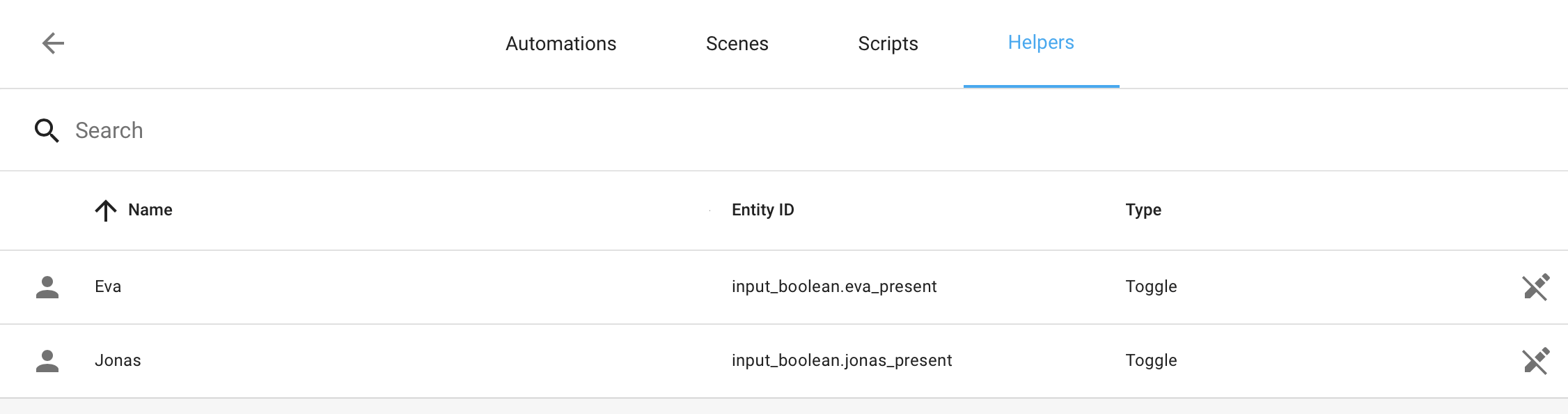
<p>Setup a boolean input helper in Home assistant for every member of your household that has a iPhone:</p>
<pre class="language-yaml"><code class="language-yaml"><span class="token key atrule">input_boolean</span><span class="token punctuation">:</span>
  <span class="token key atrule">jonas_present</span><span class="token punctuation">:</span>
    <span class="token key atrule">name</span><span class="token punctuation">:</span> Jonas
    <span class="token key atrule">icon</span><span class="token punctuation">:</span> mdi<span class="token punctuation">:</span>account
  <span class="token key atrule">eva_present</span><span class="token punctuation">:</span>
    <span class="token key atrule">name</span><span class="token punctuation">:</span> Eva
    <span class="token key atrule">icon</span><span class="token punctuation">:</span> mdi<span class="token punctuation">:</span>account</code></pre>
<p>And here is how it looks in Home assistant:
<img src="https://photo-storage.brusman.se/home-assistant-helpers.png" alt="Home assistant helpers configuration" /></p>
<h3>Home (Homekit)</h3>
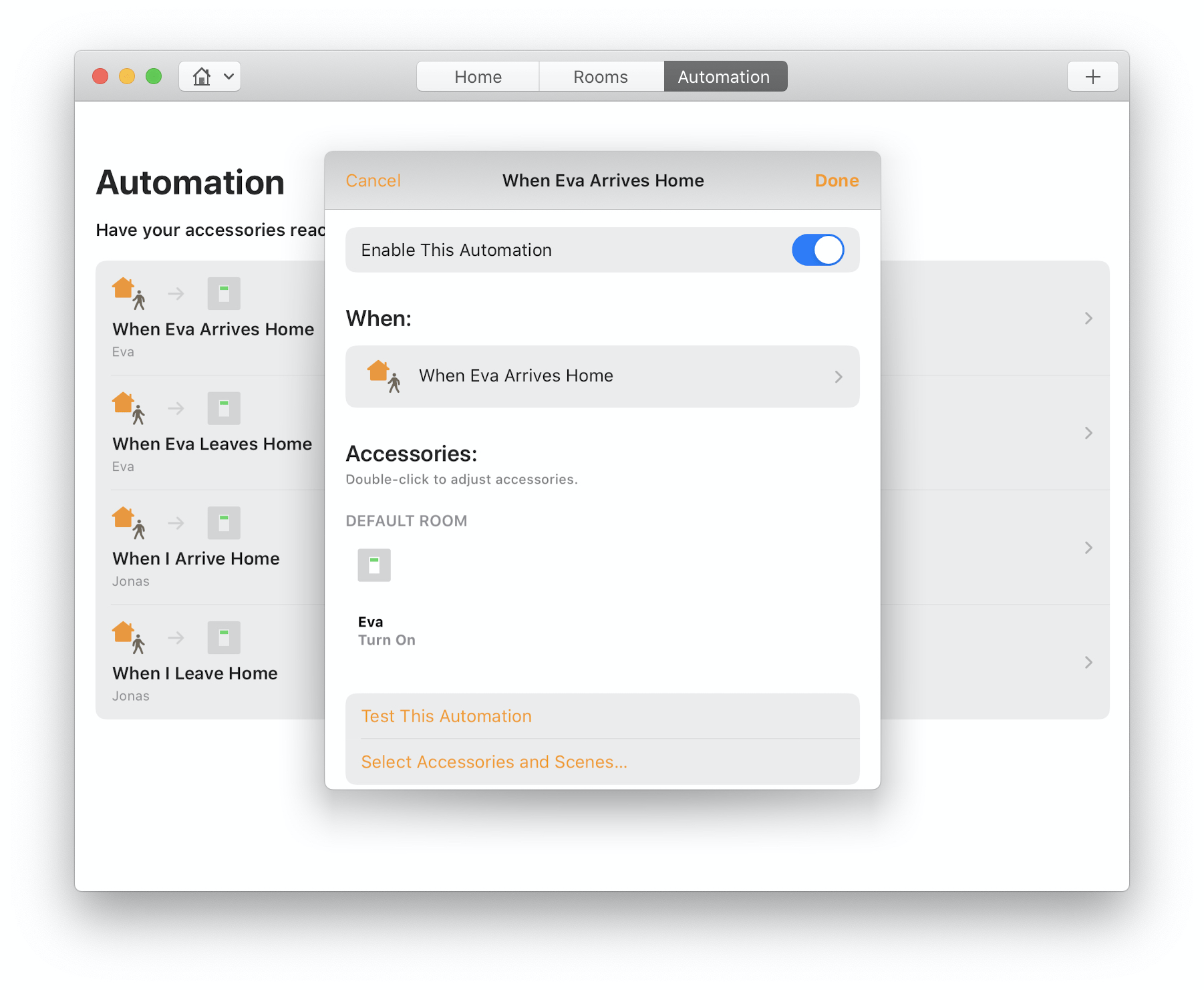
<p>First, make sure you have enable and setup <a href="https://www.home-assistant.io/integrations/homekit/">the Homekit integration</a> in Home assistant. You then need to setup some automations. One that turns the helper off when the person leaves and one that turns the helper on when they arrive home. Repeat that for every person in the household.
<img src="https://photo-storage.brusman.se/homekit-automations.png" alt="Home app automations on Mac OS" /></p>
<h3>Device tracker and Persons</h3>
<p>By now we have a working solution that we can use in our automations. But i'm not quite happy just yet, I want to connect these input helpers as <a href="https://www.home-assistant.io/integrations/device_tracker/">device trackers</a> and add them to my <a href="https://www.home-assistant.io/integrations/person/">persons in Home assistant</a>.</p>
<p>You can create an automation in Home assistant that maps the input helpers state to device trackers by using the <a href="https://www.home-assistant.io/integrations/device_tracker/#device_trackersee-service">device trackers see service</a>. That service will update or create a device tracker with the specified name. Here's my automation that create a <code>device_tracker.homekit_*</code> for every member of the household.</p>
<pre class="language-yaml"><code class="language-yaml"><span class="token punctuation">-</span> <span class="token key atrule">alias</span><span class="token punctuation">:</span> Homekit to device tracker
  <span class="token key atrule">description</span><span class="token punctuation">:</span> <span class="token string">''</span>
  <span class="token key atrule">trigger</span><span class="token punctuation">:</span>
  <span class="token punctuation">-</span> <span class="token key atrule">entity_id</span><span class="token punctuation">:</span> input_boolean.eva_present
    <span class="token key atrule">platform</span><span class="token punctuation">:</span> state
  <span class="token punctuation">-</span> <span class="token key atrule">entity_id</span><span class="token punctuation">:</span> input_boolean.jonas_present
    <span class="token key atrule">platform</span><span class="token punctuation">:</span> state
  <span class="token key atrule">condition</span><span class="token punctuation">:</span> <span class="token punctuation">[</span><span class="token punctuation">]</span>
  <span class="token key atrule">action</span><span class="token punctuation">:</span>
  <span class="token punctuation">-</span> <span class="token key atrule">data_template</span><span class="token punctuation">:</span>
      <span class="token key atrule">dev_id</span><span class="token punctuation">:</span> homekit_<span class="token punctuation">{</span><span class="token punctuation">{</span> trigger.to_state.name <span class="token punctuation">}</span><span class="token punctuation">}</span>
      <span class="token key atrule">location_name</span><span class="token punctuation">:</span> '<span class="token punctuation">{</span><span class="token punctuation">{</span> ''home'' if trigger.to_state.state == ''on'' else ''not_home''
        <span class="token punctuation">}</span><span class="token punctuation">}</span>'
    <span class="token key atrule">service</span><span class="token punctuation">:</span> device_tracker.see
  <span class="token key atrule">mode</span><span class="token punctuation">:</span> parallel
  <span class="token key atrule">max</span><span class="token punctuation">:</span> <span class="token number">10</span></code></pre>
<p>You can now assign the new device tracker to the corresponding person in home assistant. First you have to make sure that you have triggered the input boolean once first to force the automation to create the new device trackers. You can toggle the inputs in the Home app on your iPhone/Mac instead of leaving your house for real.</p>
<p>Here's the final result on my lovelace dashboard:

<img src="https://photo-storage.brusman.se/home-assistant-overview.png" alt="Home assistant persons overview" /></p>
<hr><p>Have some thoughts? <a href="mailto:blog@brusman.se?subject=Re: Home assistant presence detection with Homekit and iPhone">Send me an email.</a></p>
        ]]>
      </content>
    </entry>
    
    <entry>
      <title>Visual Studio Code: Some extensions</title>
      <link href="https://jonas.brusman.se/vs-code-extensions/"/>
      <updated>2020-05-11T00:00:00Z</updated>
      <id>https://jonas.brusman.se/vs-code-extensions/</id>
      <content type="html">
        <![CDATA[<p>Why not blog about some VS Code extensions I'm using, maybe it can inspire someone. I tried to focus on the more unique and fun ones.</p>
<h4><a href="https://marketplace.visualstudio.com/items?itemName=TabNine.tabnine-vscode">TabNine</a></h4>
<p>Mindblowing autocompletion for all languages. It uses machine learning to predict what you're typing, and it's correct almost every time.</p>
<h4><a href="https://marketplace.visualstudio.com/items?itemName=lifeart.vscode-ember-unstable">Unstable Ember Language Server</a></h4>
<p>A must-have when working with Ember.js, which I do for a living at <a href="https://www.teamtailor.com/">Teamtailor</a>.</p>
<h4><a href="https://marketplace.visualstudio.com/items?itemName=wmaurer.change-case">change-case</a></h4>
<p>Quickly toggle between camelCase and snake_case. Or between over ten other cases.</p>
<h4><a href="https://marketplace.visualstudio.com/items?itemName=dakara.transformer">Transformer</a></h4>
<p>I use the <em>unique lines</em> feature quite often.</p>
<h4><a href="https://marketplace.visualstudio.com/items?itemName=Thadeu.vscode-run-rspec-file">vscode-run-rspec-file</a></h4>
<p>Quickly run a single rspec file or even a single rspec line from within VS Code.</p>
<hr><p>Have some thoughts? <a href="mailto:blog@brusman.se?subject=Re: Visual Studio Code: Some extensions">Send me an email.</a></p>
        ]]>
      </content>
    </entry>
    
    <entry>
      <title>Cache Gatsby builds on Netlify</title>
      <link href="https://jonas.brusman.se/netlify-gatsby-cache/"/>
      <updated>2019-03-22T00:00:00Z</updated>
      <id>https://jonas.brusman.se/netlify-gatsby-cache/</id>
      <content type="html">
        <![CDATA[<p>When I started moving this site from Jekyll to <a href="https://www.gatsbyjs.org/">Gatsby</a> I noticed that my deploys to <a href="https://www.netlify.com/">Netlify</a> was very slow. Mostly because I have a lot of large photos that need to be converted and optimized to different sizes. I experienced deploy times over 10 minutes and thought that there must be something to do to speed things up.</p>
<p>When I was using Jekyll I just dumped my photos cache inside the <code>node_modules</code> directory and I thought that I just could do that now too. But it felt dirty. And hacky.</p>
<p>So I search the Netlify documentation but couldn't find anything about adding files to a cache between builds until I stumble upon a comment on StackOverflow (or was it on a Github issue?) that mentioned an undocumented cache folder and that someone <a href="https://www.npmjs.com/package/gatsby-plugin-netlify-cache">already had built a Gatsby plugin</a> that simply caches the Gatsby output in that Netlify folder. A piece of cake!</p>
<ol>
<li>Install the addon by running: <code>yarn add gatsby-plugin-netlify-cache</code></li>
<li>Add <code>'gatsby-plugin-netlify-cache'</code> to the plugins list in your <code>gatsby-config.js</code> file.</li>
</ol>
<hr><p>Have some thoughts? <a href="mailto:blog@brusman.se?subject=Re: Cache Gatsby builds on Netlify">Send me an email.</a></p>
        ]]>
      </content>
    </entry>
    
    <entry>
      <title>Divshot Jekyll hosting</title>
      <link href="https://jonas.brusman.se/divshot-jekyll-hosting/"/>
      <updated>2015-04-03T00:00:00Z</updated>
      <id>https://jonas.brusman.se/divshot-jekyll-hosting/</id>
      <content type="html">
        <![CDATA[<p>I used to <a href="https://jonas.brusman.se/jekyll-heroku-unicorn/">host this site on Heroku</a> but have now moved to a platform build for static sites, or as <a href="https://divshot.com/">Divshot</a> puts it: <em>Static Web Hosting for Developers</em>. Setting up the site on Divshot was a breeze, took just a couple of seconds from when I started reading <a href="http://docs.divshot.com/integrations/jekyll">the documentation</a> to when I had the site up and running. And they even have <a href="https://divshot.com/pricing">a free plan for small sites</a> like this one.</p>
<h3>Continious deployment with CircleCI</h3>
<p>My previous setup allowed me to just push my updates to the Github repository and have Heroku pull the changes and update the site automatically. The new setup uses <a href="https://circleci.com/">CircleCI</a> to accomplish the same. Add your Divshot token to the environment variables on CircleCi (<a href="http://docs.divshot.com/integrations/circleci">more info</a>) and then tell it to deploy on successful deploy by adding this to the <code>circle.yml</code> file in the root of the repository:</p>
<pre class="language-yaml"><code class="language-yaml"><span class="token key atrule">test</span><span class="token punctuation">:</span>
  <span class="token key atrule">override</span><span class="token punctuation">:</span>
    <span class="token punctuation">-</span> bundle exec jekyll build
<span class="token key atrule">deployment</span><span class="token punctuation">:</span>
  <span class="token key atrule">production</span><span class="token punctuation">:</span>
    <span class="token key atrule">branch</span><span class="token punctuation">:</span> master
    <span class="token key atrule">commands</span><span class="token punctuation">:</span>
      <span class="token punctuation">-</span> npm install <span class="token punctuation">-</span>g divshot<span class="token punctuation">-</span>cli
      <span class="token punctuation">-</span> divshot push production —token $DIVSHOT_TOKEN
  <span class="token key atrule">staging</span><span class="token punctuation">:</span>
    <span class="token key atrule">branch</span><span class="token punctuation">:</span> /(^(<span class="token punctuation">?</span><span class="token tag">!master$).*$)/</span>
    <span class="token key atrule">commands</span><span class="token punctuation">:</span>
      <span class="token punctuation">-</span> npm install <span class="token punctuation">-</span>g divshot<span class="token punctuation">-</span>cli
      <span class="token punctuation">-</span> divshot push staging —token $DIVSHOT_TOKEN</code></pre>
<p>It will deploy the <em>master branch to the production</em> environment and <em>all other branches to the staging</em> environment. All automatically when pushing to Github.</p>
<hr><p>Have some thoughts? <a href="mailto:blog@brusman.se?subject=Re: Divshot Jekyll hosting">Send me an email.</a></p>
        ]]>
      </content>
    </entry>
    
    <entry>
      <title>Heroku’s GitHub Integration</title>
      <link href="https://jonas.brusman.se/heroku-github-integration/"/>
      <updated>2015-01-06T00:00:00Z</updated>
      <id>https://jonas.brusman.se/heroku-github-integration/</id>
      <content type="html">
        <![CDATA[<p>Heroku has finally released <em>their own integration with Github</em>. So it’s time for me to officially retire my current solution based on my <a href="https://github.com/himynameisjonas/heroku-deployer">HerokuDeployer</a> project. An app that I build for the sole purpose of deploying this Jekyll blog with just a push to the Github repository. I’ve been using the new official Github integration as part of the closed beta for a while and it has worked flawlessly.</p>
<p>Just log in to your Heroku dashboard to <em>enable automatic deploys</em> to make Heroku build and deploy all pushes to the specified branch.</p>
<p>Read more about the new Github integration in <a href="https://devcenter.heroku.com/articles/github-integration">Heroku’s Dev Center documentation</a>.</p>
<hr><p>Have some thoughts? <a href="mailto:blog@brusman.se?subject=Re: Heroku’s GitHub Integration">Send me an email.</a></p>
        ]]>
      </content>
    </entry>
    
    <entry>
      <title>Deploy Jekyll to Heroku with a click on a button</title>
      <link href="https://jonas.brusman.se/deploy-a-unicorn-powered-jekyll-site-to-heroku-with-a-single-button-click/"/>
      <updated>2014-08-16T00:00:00Z</updated>
      <id>https://jonas.brusman.se/deploy-a-unicorn-powered-jekyll-site-to-heroku-with-a-single-button-click/</id>
      <content type="html">
        <![CDATA[<p>I've updated my <a href="https://github.com/himynameisjonas/jekyll-heroku-unicorn"><em>Jekyll + Heroku + Unicorn</em></a> sample app to the latest version of Jekyll available (2.3.0). It now have all the latest features from Jekyll!</p>
<p>I also added a <a href="https://blog.heroku.com/archives/2014/8/7/heroku-button">Heroku Button</a>. So you can deploy your own version of the Jekyll site to a new app on your Heroku account with <em>just a single click on a button</em>. You can try it directly here on this blog by clicking the button below.</p>
<div class="text-center"><a href="https://heroku.com/deploy?template=https://github.com/himynameisjonas/jekyll-heroku-unicorn"><img src="https://www.herokucdn.com/deploy/button.png" alt="Deploy" /></a></div>
<p>Pressing this button will deploy a Unicorn powered Jekyll site to Heroku. The blog will be <em>blazingly fast and handle a heavy load</em> by using Unicorn with multiple workers on per dyno. And by only using a Dyno the hosting will be <em>completely free</em>!</p>
<hr><p>Have some thoughts? <a href="mailto:blog@brusman.se?subject=Re: Deploy Jekyll to Heroku with a click on a button">Send me an email.</a></p>
        ]]>
      </content>
    </entry>
    
    <entry>
      <title>Planning Poker with Ember.js and Firebase</title>
      <link href="https://jonas.brusman.se/planning-poker-with-ember-and-firebase/"/>
      <updated>2014-06-10T00:00:00Z</updated>
      <id>https://jonas.brusman.se/planning-poker-with-ember-and-firebase/</id>
      <content type="html">
        <![CDATA[<p>Had some fun with <a href="http://emberjs.com/">Ember.js</a> and <a href="https://www.firebase.com/">Firebase</a> today. Tried out the <a href="https://github.com/firebase/emberFire">EmberFire</a> lib provided by Firebase to use Firebase with Ember-Data. I also used the <a href="http://iamstef.net/ember-cli/">Ember CLI</a> for the first time, can really recommend it. Wanted to see how easy it would be to build an <em>real time syncing Ember.js app</em> and then deploy it to the new and easy to use <em>Firebase hosting</em> service.</p>
<p>It resulted in a <a href="https://mnd-vote.firebaseapp.com/">simple planning poker app</a> to help with the sprint planning for my remote team. I've uploaded the <a href="https://github.com/himynameisjonas/emberfire-poker">source to Github</a>.</p>
<hr><p>Have some thoughts? <a href="mailto:blog@brusman.se?subject=Re: Planning Poker with Ember.js and Firebase">Send me an email.</a></p>
        ]]>
      </content>
    </entry>
    
    <entry>
      <title>Jekyll 1.0</title>
      <link href="https://jonas.brusman.se/jekyll-1-dot-0/"/>
      <updated>2013-05-27T00:00:00Z</updated>
      <id>https://jonas.brusman.se/jekyll-1-dot-0/</id>
      <content type="html">
        <![CDATA[<p>The <a href="http://jekyllrb.com/">Jekyll</a> gem have been <em>updated to 1.0</em>. So I've now updated both <a href="https://github.com/himynameisjonas/jonas.brusman.se">this site's source</a> (even made the repository open!) and my example repository for <a href="https://jonas.brusman.se/jekyll-heroku-unicorn"><em>hosting a Jekyll site on Heroku</em></a>.</p>
<hr><p>Have some thoughts? <a href="mailto:blog@brusman.se?subject=Re: Jekyll 1.0">Send me an email.</a></p>
        ]]>
      </content>
    </entry>
    
    <entry>
      <title>Breakfast at Mynewsdesk</title>
      <link href="https://jonas.brusman.se/breakfast-at-mynewsdesk/"/>
      <updated>2013-01-02T00:00:00Z</updated>
      <id>https://jonas.brusman.se/breakfast-at-mynewsdesk/</id>
      <content type="html">
        <![CDATA[<img src="">
        <img src="">
        <img src="">
        <img src="">
        <img src="">
        <img src="">
        <img src="">
        <img src="/img/NamEi_naeM-1200.jpeg">
        <img src="/img/aX2IZ6L6HS-1200.jpeg">
        <img src="/img/bez3gk86vm-1200.jpeg">
        <img src="/img/NLP-r3BPfW-1200.jpeg">
        <img src="/img/tTlNdWu2nx-1200.jpeg">
        <img src="/img/bTDMj1F2hV-1200.jpeg">
        <img src="/img/YRdD2RPvQY-1200.jpeg">
        <img src="">
        <img src="">
        <img src="">
        <img src="">
        <img src="">
        <img src="">
        <img src="/img/so9vqKji9G-1200.jpeg">
        <img src="">
        <img src="/img/QgQ5bpvivd-1200.jpeg">
        <img src="/img/5KxTwM6raC-1200.jpeg">
        <img src="/img/KtgfRY3E-M-1200.jpeg">
        <img src="/img/b5pshFycjG-1200.jpeg">
        <img src="/img/_phBMbPQ8K-1200.jpeg">
        <img src="/img/I3fr6GwDnF-1200.jpeg">
        <img src="/img/zFSGbOeFsM-1200.jpeg">
        <img src="/img/H63T77Xh-i-1200.jpeg">
        <img src="/img/LgEDxQ-1Js-1200.jpeg">
        <img src="/img/B5qsHieHkE-1200.jpeg">
        <img src="">
        <p>Every Monday morning at 8:00 breakfast is served for the Mynewsdesk employees at our headquarter in Stockholm. It became some sort of tradition for me to take a photograph of my breakfast every morning and here’s the result from 2012’s breakfasts.</p>
<hr><p>Have some thoughts? <a href="mailto:blog@brusman.se?subject=Re: Breakfast at Mynewsdesk">Send me an email.</a></p>
        ]]>
      </content>
    </entry>
    
    <entry>
      <title>Jekyll code highlighting on Heroku</title>
      <link href="https://jonas.brusman.se/jekyll-code-highlighting-on-heroku/"/>
      <updated>2012-12-31T00:00:00Z</updated>
      <id>https://jonas.brusman.se/jekyll-code-highlighting-on-heroku/</id>
      <content type="html">
        <![CDATA[<p>The built in code highlighter in Jekyll doesn't work on Heroku due to some issues with Python. I came up with a <em>work around by using the <a href="https://rubygems.org/gems/pygmentize">Pygmentize</a> gem</em> instead.</p>
<h3>Gemfile</h3>
<p>Add the Pygmentize gem to your gemfile:</p>
<pre class="language-ruby"><code class="language-ruby">gem <span class="token string-literal"><span class="token string">'pygmentize'</span></span></code></pre>
<p>And run <code>bundle install</code></p>
<h3>_plugins/highlight.rb</h3>
<p>Create a new file in the <code>_plugins</code> directory with the name <code>highlight.rb</code>. Paste the following code to <em>make the built in code highlighter use the new Pygmentize gem</em>:</p>
<pre class="language-ruby"><code class="language-ruby"><span class="token keyword">require</span> <span class="token string-literal"><span class="token string">'pygmentize'</span></span>
<span class="token keyword">class</span> <span class="token class-name">Jekyll</span><span class="token double-colon punctuation">::</span>HighlightBlock <span class="token operator">&lt;</span> Liquid<span class="token double-colon punctuation">::</span>Block
  <span class="token keyword">def</span> <span class="token method-definition"><span class="token function">render_pygments</span></span><span class="token punctuation">(</span>context<span class="token punctuation">,</span> code<span class="token punctuation">)</span>
    <span class="token variable">@options</span><span class="token punctuation">[</span><span class="token symbol">:encoding</span><span class="token punctuation">]</span> <span class="token operator">=</span> <span class="token string-literal"><span class="token string">'utf-8'</span></span>
    output <span class="token operator">=</span> add_code_tags<span class="token punctuation">(</span>
      Pygmentize<span class="token punctuation">.</span>process<span class="token punctuation">(</span>code<span class="token punctuation">,</span> <span class="token variable">@lang</span><span class="token punctuation">)</span><span class="token punctuation">,</span>
      <span class="token variable">@lang</span>
    <span class="token punctuation">)</span>

    output <span class="token operator">=</span> context<span class="token punctuation">[</span><span class="token string-literal"><span class="token string">"pygments_prefix"</span></span><span class="token punctuation">]</span> <span class="token operator">+</span> output <span class="token keyword">if</span> context<span class="token punctuation">[</span><span class="token string-literal"><span class="token string">"pygments_prefix"</span></span><span class="token punctuation">]</span>
    output <span class="token operator">=</span> output <span class="token operator">+</span> context<span class="token punctuation">[</span><span class="token string-literal"><span class="token string">"pygments_suffix"</span></span><span class="token punctuation">]</span> <span class="token keyword">if</span> context<span class="token punctuation">[</span><span class="token string-literal"><span class="token string">"pygments_suffix"</span></span><span class="token punctuation">]</span>
    output
  <span class="token keyword">end</span>
<span class="token keyword">end</span></code></pre>
<h3>Use</h3>
<p>Just use the <em>standard highlight blocks as usual</em>:</p>
<pre class="language-html"><code class="language-html">``` ruby gem 'pygmentize' ```</code></pre>
<hr><p>Have some thoughts? <a href="mailto:blog@brusman.se?subject=Re: Jekyll code highlighting on Heroku">Send me an email.</a></p>
        ]]>
      </content>
    </entry>
    
    <entry>
      <title>Create Jekyll posts from the command line</title>
      <link href="https://jonas.brusman.se/create-jekyll-posts-from-the-command-line/"/>
      <updated>2012-12-28T00:00:00Z</updated>
      <id>https://jonas.brusman.se/create-jekyll-posts-from-the-command-line/</id>
      <content type="html">
        <![CDATA[<p>I got <em>tired on creating new files manually</em> for each new post a write so I put together this little <em>command line task</em> with <a href="https://github.com/wycats/thor">Thor</a>.</p>
<p>It creates a new file in the <code>_posts</code> directory with <em>today's date</em>, parses the <em>parameters to command as the post's title</em> and adds that as a slug to the new file. It then writes a <em>default yaml template</em> to the file (as specified in the script).</p>
<p>Running <code>thor jekyll:new New and shiny post</code> will for example create the file <code>_posts/2012-12-28-new-and-shiny-post.md</code>, populate it with an yaml template and finally open the file in my favorite editor.</p>
<h3>How to</h3>
<p>Add the following to your Gemfile:</p>
<pre class="language-ruby"><code class="language-ruby">gem <span class="token string-literal"><span class="token string">'thor'</span></span>
gem <span class="token string-literal"><span class="token string">'stringex'</span></span></code></pre>
<p>Run <code>bundle install</code> and create a <code>jekyll.thor</code> file with the following contents:</p>
<pre class="language-ruby"><code class="language-ruby"><span class="token keyword">require</span> <span class="token string-literal"><span class="token string">"stringex"</span></span>
<span class="token keyword">class</span> <span class="token class-name">Jekyll</span> <span class="token operator">&lt;</span> Thor
  desc <span class="token string-literal"><span class="token string">"new"</span></span><span class="token punctuation">,</span> <span class="token string-literal"><span class="token string">"create a new post"</span></span>
  method_option <span class="token symbol">:editor</span><span class="token punctuation">,</span> <span class="token symbol">:default</span> <span class="token operator">=></span> <span class="token string-literal"><span class="token string">"subl"</span></span>
  <span class="token keyword">def</span> <span class="token method-definition"><span class="token function">new</span></span><span class="token punctuation">(</span><span class="token operator">*</span>title<span class="token punctuation">)</span>
    title <span class="token operator">=</span> title<span class="token punctuation">.</span>join<span class="token punctuation">(</span><span class="token string-literal"><span class="token string">" "</span></span><span class="token punctuation">)</span>
    date <span class="token operator">=</span> <span class="token builtin">Time</span><span class="token punctuation">.</span>now<span class="token punctuation">.</span>strftime<span class="token punctuation">(</span><span class="token string-literal"><span class="token string">'%Y-%m-%d'</span></span><span class="token punctuation">)</span>
    filename <span class="token operator">=</span> <span class="token string-literal"><span class="token string">"_posts/</span><span class="token interpolation"><span class="token delimiter punctuation">#{</span><span class="token content">date</span><span class="token delimiter punctuation">}</span></span><span class="token string">-</span><span class="token interpolation"><span class="token delimiter punctuation">#{</span><span class="token content">title<span class="token punctuation">.</span>to_url</span><span class="token delimiter punctuation">}</span></span><span class="token string">.md"</span></span>

    <span class="token keyword">if</span> <span class="token builtin">File</span><span class="token punctuation">.</span>exist<span class="token operator">?</span><span class="token punctuation">(</span>filename<span class="token punctuation">)</span>
      abort<span class="token punctuation">(</span><span class="token string-literal"><span class="token string">"</span><span class="token interpolation"><span class="token delimiter punctuation">#{</span><span class="token content">filename</span><span class="token delimiter punctuation">}</span></span><span class="token string"> already exists!"</span></span><span class="token punctuation">)</span>
    <span class="token keyword">end</span>

    puts <span class="token string-literal"><span class="token string">"Creating new post: </span><span class="token interpolation"><span class="token delimiter punctuation">#{</span><span class="token content">filename</span><span class="token delimiter punctuation">}</span></span><span class="token string">"</span></span>
    open<span class="token punctuation">(</span>filename<span class="token punctuation">,</span> <span class="token string-literal"><span class="token string">'w'</span></span><span class="token punctuation">)</span> <span class="token keyword">do</span> <span class="token operator">|</span>post<span class="token operator">|</span>
      post<span class="token punctuation">.</span>puts <span class="token string-literal"><span class="token string">"---"</span></span>
      post<span class="token punctuation">.</span>puts <span class="token string-literal"><span class="token string">"templateKey: blog-post"</span></span>
      post<span class="token punctuation">.</span>puts <span class="token string-literal"><span class="token string">"title: \"</span><span class="token interpolation"><span class="token delimiter punctuation">#{</span><span class="token content">title</span><span class="token delimiter punctuation">}</span></span><span class="token string">\""</span></span>
      post<span class="token punctuation">.</span>puts <span class="token string-literal"><span class="token string">"tags:"</span></span>
      post<span class="token punctuation">.</span>puts <span class="token string-literal"><span class="token string">" -"</span></span>
      post<span class="token punctuation">.</span>puts <span class="token string-literal"><span class="token string">"---"</span></span>
    <span class="token keyword">end</span>

    system<span class="token punctuation">(</span>options<span class="token punctuation">[</span><span class="token symbol">:editor</span><span class="token punctuation">]</span><span class="token punctuation">,</span> filename<span class="token punctuation">)</span>
  <span class="token keyword">end</span>
<span class="token keyword">end</span></code></pre>
<p>Use the new command:</p>
<pre class="language-shell"><code class="language-shell">$ thor jekyll:new The title of the new post</code></pre>
<p>You can even specify which editor to open the new file with:</p>
<pre class="language-shell"><code class="language-shell">$ thor jekyll:new The title of the new post <span class="token parameter variable">--editor</span><span class="token operator">=</span>vim</code></pre>
<p>The default editor is Sublime Text 2, just change on line 4 in <code>jekyll.thor</code> if an other editor is preferred.</p>
<hr><p>Have some thoughts? <a href="mailto:blog@brusman.se?subject=Re: Create Jekyll posts from the command line">Send me an email.</a></p>
        ]]>
      </content>
    </entry>
    
    <entry>
      <title>Mynewsdesk through Loopcam</title>
      <link href="https://jonas.brusman.se/mynewsdesk-through-loopcam/"/>
      <updated>2012-10-11T00:00:00Z</updated>
      <id>https://jonas.brusman.se/mynewsdesk-through-loopcam/</id>
      <content type="html">
        <![CDATA[<p><img src="https://photo-storage.brusman.se/0053.gif" alt="Stekarveven" /></p>
<p><img src="https://photo-storage.brusman.se/0048.gif" alt=":D" /></p>
<p><img src="https://photo-storage.brusman.se/0034.gif" alt="Kickoff" /></p>
<p><img src="https://photo-storage.brusman.se/0033.gif" alt="Kickoff" /></p>
<p><img src="https://photo-storage.brusman.se/0043.gif" alt="RC-car" /></p>
<p><img src="https://photo-storage.brusman.se/0011.gif" alt="Nordic Ruby" /></p>
<p>Having fun with <a href="http://loopc.am/himynameisjonas">Loopcam</a>.</p>
<hr><p>Have some thoughts? <a href="mailto:blog@brusman.se?subject=Re: Mynewsdesk through Loopcam">Send me an email.</a></p>
        ]]>
      </content>
    </entry>
    
    <entry>
      <title>A web interface to Jekyll</title>
      <link href="https://jonas.brusman.se/web-interface-to-jekyll-with-auto-deploy-to-heroku/"/>
      <updated>2012-08-08T00:00:00Z</updated>
      <id>https://jonas.brusman.se/web-interface-to-jekyll-with-auto-deploy-to-heroku/</id>
      <content type="html">
        <![CDATA[<p>Use <a href="http://prose.io/">Prose</a>, <em>a content editor for GitHub, optimized for managing websites</em>, to get a web based interface for managing your Jekyll site (or other text-based content in your Github repositories). You can now write a new blog post or fix that typo <em>without even leaving the browser</em>. You can even specify <a href="http://prose.io/help/handbook.html#metadata_defaults">metadata defaults</a> for your posts.</p>
<p>This work really out of the box if you host your site on Github via <a href="http://pages.github.com/">Github pages</a> but if you, like me, are using Heroku you need to set up some more automation. See my previous post on how to <em><a href="https://jonas.brusman.se/deploy-to-heroku-from-github">automatically deploy to Heroku when pushing to Github</a></em>.</p>
<hr><p>Have some thoughts? <a href="mailto:blog@brusman.se?subject=Re: A web interface to Jekyll">Send me an email.</a></p>
        ]]>
      </content>
    </entry>
    
    <entry>
      <title>Deploy to Heroku from Github</title>
      <link href="https://jonas.brusman.se/deploy-to-heroku-from-github/"/>
      <updated>2012-07-29T00:00:00Z</updated>
      <id>https://jonas.brusman.se/deploy-to-heroku-from-github/</id>
      <content type="html">
        <![CDATA[<p><em>Automatically deployment of your app to Heroku when it has been pushed to Github</em> with <a href="https://github.com/ajlai/github-heroku-pusher">github-heroku-pusher</a> by <a href="https://github.com/ajlai">ajlai on Github</a>.</p>
<p>I found this little Sinatra app a couple of days ago and have now set up it to automatically deploy this Jekyll site to Heroku when I push the repository to my Github account. It receives a post from Github via the post-receive service hook, fetches the updates and push them to Heroku.</p>
<p>I have made some changes to the app, so <em>use <a href="https://github.com/himynameisjonas/github-heroku-pusher">my fork</a></em> until the pull requests has been merged. My fork adds support for <em>private repositories</em> and makes it run smoothly on just <em>one free Heroku Dyno</em>.</p>
<p>Just follow the instructions in <a href="https://github.com/himynameisjonas/github-heroku-pusher">the README</a> and you're <em>done in less than 5 minutes</em>.</p>
<hr />
<h3>Update <em>2014-06-10</em></h3>
<p>I've have switch to a <a href="https://github.com/himynameisjonas/heroku-deployer">more competent solution for my continuous deployment to Heroku</a>.</p>
<h3>Update <em>2015-02-01</em></h3>
<p>Heroku has released <a href="https://jonas.brusman.se/heroku-github-integration">their own Github integration</a>.</p>
<hr><p>Have some thoughts? <a href="mailto:blog@brusman.se?subject=Re: Deploy to Heroku from Github">Send me an email.</a></p>
        ]]>
      </content>
    </entry>
    
    <entry>
      <title>Jekyll + Heroku + Unicorn = Blazing fast blogging</title>
      <link href="https://jonas.brusman.se/jekyll-heroku-unicorn/"/>
      <updated>2012-07-22T00:00:00Z</updated>
      <id>https://jonas.brusman.se/jekyll-heroku-unicorn/</id>
      <content type="html">
        <![CDATA[<p>Deploy your <a href="http://jekyllrb.com/">Jekyll</a> site on <a href="http://www.heroku.com/">Heroku</a> with <em>6 workers</em> ready to take on your massive traffic <em>without first having to generate</em> the Jekyll site locally and there's <em>no need for a third-party buildpack</em>. And the best of all, it runs on a <em>single and free Heroku Dyno</em>.</p>
<h3>Rack-Jekyll</h3>
<p>I have previously used <code>jekyll --server</code>in my <code>Procfile</code> on Heroku which in turn generated the jekyll site and booted up a webrick server. But I wanted to run my site with <a href="http://unicorn.bogomips.org/">Unicorn</a> and it's support for multiple workers on a single Dyno. And to do so my Jekyll site must be a <a href="http://rack.github.com/">Rack</a> app.</p>
<p><a href="https://github.com/adaoraul/rack-jekyll">Rack-Jekyll</a> to the rescue! It was exactly what I was looking for, it turned a Jekyll site into a Rack app. I had some issues with it on Heroku and made a pull request with the fixes. At this moment it has been merge with the master but there is not a new version released of the gem.</p>
<h3>Jekyll + Unicorn + Heroku</h3>
<p><a href="https://github.com/himynameisjonas/jekyll-heroku-unicorn">Jekyll-Heroku-Unicorn</a> is a sample app of a simple Jykyll site with <em>6 Unicorn workers</em> ready to be <em>deployed to a free Heroku Dyno</em>:</p>
<ol>
<li><code>git clone git@github.com:himynameisjonas/jekyll-heroku-unicorn.git</code></li>
<li><code>cd jekyll-heroku-unicorn</code> and run <code>bundle install</code></li>
<li><code>heroku create</code> followed of <code>git push heroku master</code></li>
<li><code>heroku open</code> <em>and you're done</em>!</li>
</ol>
<hr><p>Have some thoughts? <a href="mailto:blog@brusman.se?subject=Re: Jekyll + Heroku + Unicorn = Blazing fast blogging">Send me an email.</a></p>
        ]]>
      </content>
    </entry>
    
    <entry>
      <title>A Flickr plugin to Jekyll</title>
      <link href="https://jonas.brusman.se/flickr-plugin-for-jekyll/"/>
      <updated>2012-04-15T00:00:00Z</updated>
      <id>https://jonas.brusman.se/flickr-plugin-for-jekyll/</id>
      <content type="html">
        <![CDATA[<p>This blog is driven by <a href="http://jekyllrb.com/">Jekyll</a> and i have written a simple plugin to Jekyll that makes it easy to embed photographs from <a href="http://flickr.com/">Flickr</a> directly into your posts.</p>
<p>If you have a Gemfile, start by adding the <code>fleakr</code> gem to your Gemfile and run <code>bundle install</code>.
If you don't have a Gemfile, install the gem with <code>gem install fleakr</code>.</p>
<pre class="language-ruby"><code class="language-ruby">source <span class="token symbol">:rubygems</span>

gem <span class="token string-literal"><span class="token string">'RedCloth'</span></span>
gem <span class="token string-literal"><span class="token string">'jekyll'</span></span>
gem <span class="token string-literal"><span class="token string">'fleakr'</span></span></code></pre>
<p>Then add the flickr plugin to your <code>_plugins</code> folder:</p>
<pre class="language-ruby"><code class="language-ruby"><span class="token keyword">require</span> <span class="token string-literal"><span class="token string">'liquid'</span></span>
<span class="token keyword">require</span> <span class="token string-literal"><span class="token string">'fleakr'</span></span>

Fleakr<span class="token punctuation">.</span>api_key       <span class="token operator">=</span> <span class="token string-literal"><span class="token string">"XXX"</span></span>
Fleakr<span class="token punctuation">.</span>shared_secret <span class="token operator">=</span> <span class="token string-literal"><span class="token string">"YYY"</span></span>
Fleakr<span class="token punctuation">.</span>auth_token    <span class="token operator">=</span> <span class="token string-literal"><span class="token string">"ZZZ"</span></span>

<span class="token constant">CACHED_IMAGES</span> <span class="token operator">=</span> <span class="token punctuation">{</span><span class="token punctuation">}</span>

<span class="token keyword">module</span> <span class="token class-name">Flickr</span>
  <span class="token keyword">def</span> <span class="token method-definition"><span class="token function">flickr_image</span></span><span class="token punctuation">(</span>url<span class="token punctuation">)</span>
    <span class="token string-literal"><span class="token string">"&lt;img alt='</span><span class="token interpolation"><span class="token delimiter punctuation">#{</span><span class="token content">image_object<span class="token punctuation">(</span>url<span class="token punctuation">)</span><span class="token punctuation">.</span>title</span><span class="token delimiter punctuation">}</span></span><span class="token string">' src='</span><span class="token interpolation"><span class="token delimiter punctuation">#{</span><span class="token content">image_object<span class="token punctuation">(</span>url<span class="token punctuation">)</span><span class="token punctuation">.</span>large<span class="token punctuation">.</span>url</span><span class="token delimiter punctuation">}</span></span><span class="token string">'>"</span></span>
  <span class="token keyword">end</span>

  <span class="token keyword">def</span> <span class="token method-definition"><span class="token function">flickr_medium_image</span></span><span class="token punctuation">(</span>url<span class="token punctuation">)</span>
    <span class="token string-literal"><span class="token string">"&lt;img alt='</span><span class="token interpolation"><span class="token delimiter punctuation">#{</span><span class="token content">image_object<span class="token punctuation">(</span>url<span class="token punctuation">)</span><span class="token punctuation">.</span>title</span><span class="token delimiter punctuation">}</span></span><span class="token string">' src='</span><span class="token interpolation"><span class="token delimiter punctuation">#{</span><span class="token content">image_object<span class="token punctuation">(</span>url<span class="token punctuation">)</span><span class="token punctuation">.</span>medium<span class="token punctuation">.</span>url</span><span class="token delimiter punctuation">}</span></span><span class="token string">'>"</span></span>
  <span class="token keyword">end</span>

  <span class="token keyword">private</span>

  <span class="token keyword">def</span> <span class="token method-definition"><span class="token function">image_object</span></span><span class="token punctuation">(</span>url<span class="token punctuation">)</span>
    <span class="token constant">CACHED_IMAGES</span><span class="token punctuation">[</span>url<span class="token punctuation">]</span> <span class="token operator">||=</span> Fleakr<span class="token punctuation">.</span>resource_from_url<span class="token punctuation">(</span>url<span class="token punctuation">)</span>
  <span class="token keyword">end</span>
<span class="token keyword">end</span>

Liquid<span class="token double-colon punctuation">::</span>Template<span class="token punctuation">.</span>register_filter<span class="token punctuation">(</span>Flickr<span class="token punctuation">)</span></code></pre>
<p>Read the <a href="https://github.com/reagent/fleakr">readme for the fleakr gem</a> on how to obtain your flickr api tokens. Then add them to the top of the flickr.rb file.</p>
<p>Loop over your photos in your post layout, for example like this:</p>
<pre class="language-html"><code class="language-html"><span class="token tag"><span class="token tag"><span class="token punctuation">&lt;</span>article</span><span class="token punctuation">></span></span>
  <span class="token tag"><span class="token tag"><span class="token punctuation">&lt;</span>h1</span><span class="token punctuation">></span></span>{{ post.title }}<span class="token tag"><span class="token tag"><span class="token punctuation">&lt;/</span>h1</span><span class="token punctuation">></span></span>

  {% for flickr_url in post.flickr %}
    <span class="token tag"><span class="token tag"><span class="token punctuation">&lt;</span>a</span> <span class="token attr-name">href</span><span class="token attr-value"><span class="token punctuation attr-equals">=</span><span class="token punctuation">"</span>{{ flickr_url }}<span class="token punctuation">"</span></span><span class="token punctuation">></span></span>{{ flickr_url | flickr_image }}<span class="token tag"><span class="token tag"><span class="token punctuation">&lt;/</span>a</span><span class="token punctuation">></span></span>
  {% endfor %}

  {{ post.content }}

  <span class="token tag"><span class="token tag"><span class="token punctuation">&lt;</span>footer</span><span class="token punctuation">></span></span>
    {{ post.date || date:"%Y-%m-%d" }}<span class="token tag"><span class="token tag"><span class="token punctuation">&lt;/</span>br</span><span class="token punctuation">></span></span>
  <span class="token tag"><span class="token tag"><span class="token punctuation">&lt;/</span>footer</span><span class="token punctuation">></span></span>
<span class="token tag"><span class="token tag"><span class="token punctuation">&lt;/</span>article</span><span class="token punctuation">></span></span></code></pre>
<p>Finally, the last step is to add one or more photos to your post:</p>
<pre class="language-html"><code class="language-html">---
title: A blog post with photos from flickr
photos:
  - 'https://photo-storage.brusman.se/6167152072.jpg'
  - 'https://photo-storage.brusman.se/6167152448.jpg'
  - 'https://photo-storage.brusman.se/6167153574.jpg'
---

Lorem ipsum dolor sit amet, consectetur adipisicing elit, sed do eiusmod tempor
incididunt ut labore et dolore magna aliqua. Ut enim ad minim veniam, quis
nostrud exercitation ullamco laboris nisi ut aliquip ex ea commodo consequat.</code></pre>
<p>I have also published all these <a href="https://gist.github.com/2380125">examples as a gist</a>.</p>
<hr><p>Have some thoughts? <a href="mailto:blog@brusman.se?subject=Re: A Flickr plugin to Jekyll">Send me an email.</a></p>
        ]]>
      </content>
    </entry>
    
    <entry>
      <title>Malware, Reddit and Google Analytics</title>
      <link href="https://jonas.brusman.se/malware-reddit-and-google-analytics/"/>
      <updated>2012-01-31T00:00:00Z</updated>
      <id>https://jonas.brusman.se/malware-reddit-and-google-analytics/</id>
      <content type="html">
        <![CDATA[<p><img src="https://photo-storage.brusman.se/malware_analytics.png" alt="malware analytics" title="malware analytics" />
This is what happens with your traffic when one of your sites gets infected by malware and therefor being &quot;blocked&quot; by google. From a daily count of 200-300 visitors down to 0-2 visitors per day. But it's a funny graph to look at.</p>
<p><img src="https://photo-storage.brusman.se/reddit_analytics.png" alt="reddit analytics" title="reddit analytics" />
And this is the awesome thing that happens when one of the posts of the same site as above is posted and gets popular on <a href="http://reddit.com/">reddit</a>. From a stable 150-200 visitors per to a huge peak at 20 000. Such a big difference that the rest of the days looks all flat.</p>
<hr><p>Have some thoughts? <a href="mailto:blog@brusman.se?subject=Re: Malware, Reddit and Google Analytics">Send me an email.</a></p>
        ]]>
      </content>
    </entry>
    
    <entry>
      <title>Hello World!</title>
      <link href="https://jonas.brusman.se/hello-world/"/>
      <updated>2012-01-13T00:00:00Z</updated>
      <id>https://jonas.brusman.se/hello-world/</id>
      <content type="html">
        <![CDATA[<p>Hello world! The must-have post of a blog. I don't know how many blogs i have started but if I know myself this isn't the last one. Sadly...</p>
<p>However, the plan is to post some photos and maybe even some things about my other hobby (besides photography) coding/web development/yadayada. Time will tell.</p>
<hr><p>Have some thoughts? <a href="mailto:blog@brusman.se?subject=Re: Hello World!">Send me an email.</a></p>
        ]]>
      </content>
    </entry>
</feed>